Define calculation order before configuring a plan, then use boundary tests to expose ambiguous thresholds, credit splits, bonuses and caps.
Commission software should apply thresholds, accelerators and overlapping rules in an explicit order, return the intended result at each boundary, and make the calculation explainable. For an operations owner, Qobra’s no-code rules and simulation capabilities make it a practical candidate—but acceptance should depend on reproducing your plan’s exact arithmetic, not simply supporting a list of rule types.
Start with one compensation period and a deliberately difficult dataset. An ordinary deal can calculate correctly while concealing mistakes that appear only when a rep crosses a threshold, shares credit or qualifies for several incentives simultaneously.
Define the meaning of each rule before building formulas
A threshold activates an earning or changes its calculation. An accelerator increases a commission rate when attainment reaches a defined level. Neither term fully specifies the arithmetic.
Distinguish marginal treatment, where the higher rate applies only to revenue above a boundary, from retroactive treatment, where crossing it changes the rate on earlier eligible revenue too. Also specify whether a boundary is inclusive: “at least $50,000” and “more than $50,000” produce different results at exactly $50,000.
Before configuration, record the measurement basis, period, credited person, eligibility event, credit allocation, bonus stacking, cap scope and rounding method. Identify the source field for each input. A formula cannot reliably implement “new logo” if nobody has defined which records qualify.
Use one coherent plan to establish precedence
The following hypothetical plan illustrates calculation testing, not recommended compensation policy. Every test is independent and covers one rep in one month. Amounts are USD; eligible bookings are nonnegative, and there is no additional credited revenue beyond the inputs shown.
- Apply each deal’s credit percentage before aggregating monthly credited revenue.
- Below $50,000 of credit, commission is zero. At $50,000, 5% activates on all credited revenue through $100,000.
- Only revenue above $100,000 earns 8%.
- Add one $500 monthly bonus when at least one qualifying new logo is credited to the rep and the $50,000 gate is met. Do not split that bonus again.
- Cap total monthly commission, including the bonus, at $7,000.
- Retain precision through the calculation, then round the final amount to cents, with half cents rounded up.
- Require an explicit credit percentage, including 100% for unsplit deals; missing credit must block the affected calculation for review.
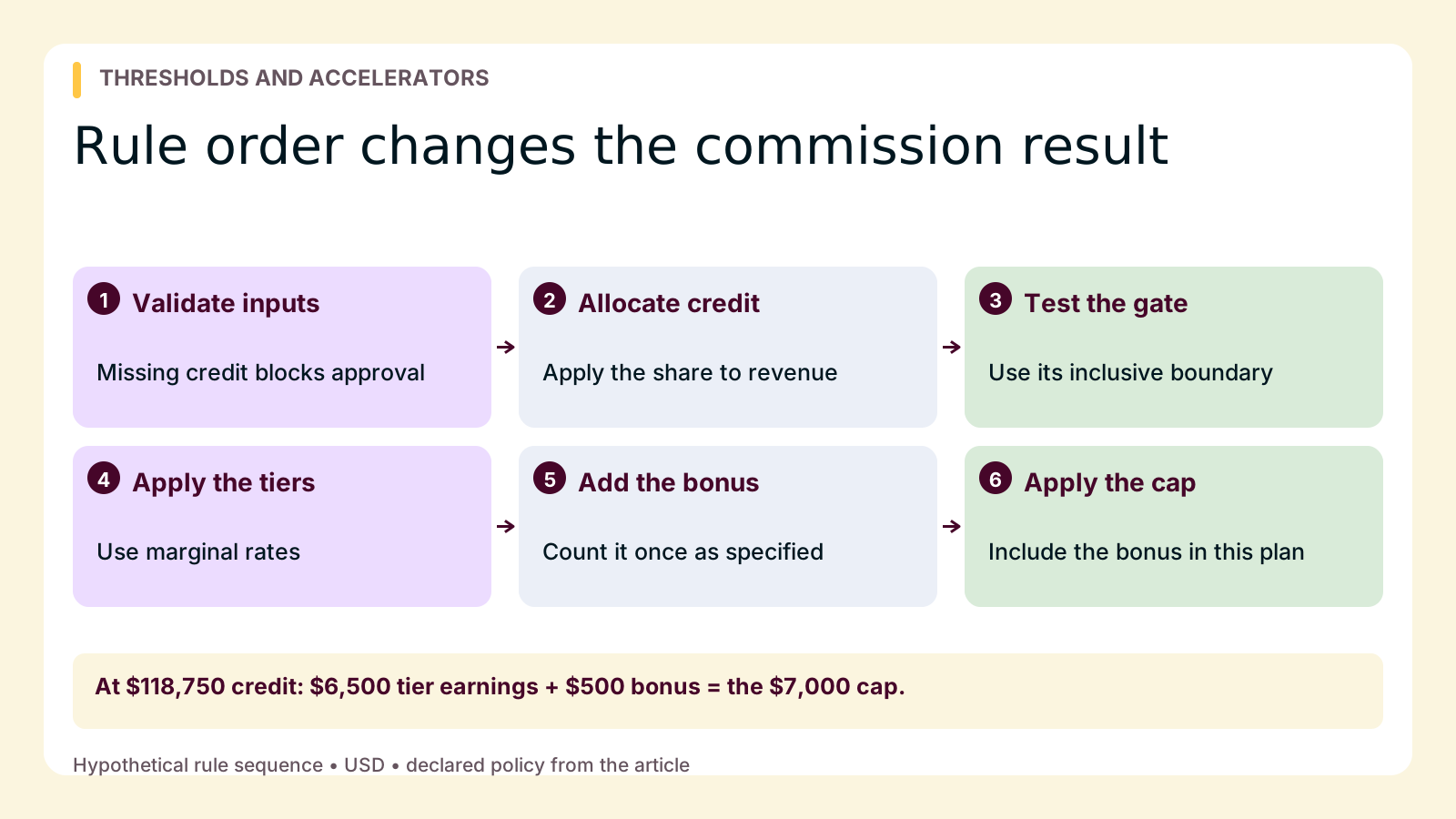
The sequence is therefore: validate inputs, allocate credit, aggregate attainment, evaluate the gate, calculate marginal tiers, add the eligible bonus, apply the cap, then round. Different approved plans may require different sequences.
Show why changing the order changes earnings
Marginal versus retroactive: at $110,000 of credited revenue without a bonus, this plan produces $5,000 plus $800, or $5,800. Applying 8% retroactively would produce $8,800 before the cap and $7,000 afterward. Inspect the pre-cap amount as well as the final result; a cap can conceal calculation differences.
Credit before rates: a $120,000 deal with 50% credit yields $60,000 of attainment and $3,000 of commission. Calculating commission on the whole deal first would produce $6,600; splitting that commission afterward yields $3,300. The $300 difference comes from letting unallocated revenue influence the rate.
Cap after bonus: at $120,000 of credit with a qualifying logo, tiered earnings are $6,600. Adding $500 produces $7,100, capped at $7,000. Capping the tiered earnings first and adding the bonus afterward would instead produce $7,100.
These are calculation semantics within one period. Questions about authorizing revisions or preserving earlier versions belong to controlling changes to a multi-rule plan. Establish what the current rules mean before deciding how to change them.
Test immediately below, at and above each boundary
In this illustrative worksheet, “credit” means the monthly total after allocation. A row marked “no bonus” has no qualifying new logo; all inputs are complete unless stated otherwise. The one-dollar increments make the intended behavior easy to inspect.
| Inputs | Intended rule | Expected result | Exception to review |
|---|---|---|---|
| $49,999 credit; qualifying logo | Gate blocks base and bonus | $0 | Bonus bypasses the gate |
| $50,000 credit; no bonus | Inclusive activation on all credit | $2,500 | Only excess above gate earns commission |
| $50,001 credit; no bonus | 5% base rate | $2,500.05 | Wrong rate after activation |
| $99,999 credit; no bonus | Below accelerator | $4,999.95 | Premature higher rate |
| $100,000 credit; no bonus | No revenue above breakpoint | $5,000 | Retroactive accelerator |
| $100,001 credit; no bonus | 8% on excess dollar only | $5,000.08 | Higher rate applied to entire total |
| $120,000 deal; 50% credit; no bonus | Allocate before attainment | $60,000 credit; $3,000 commission | $3,300 from splitting earnings afterward |
| $110,000 credit; two qualifying logos | One monthly bonus | $5,800 + $500 = $6,300 | Bonus counted twice |
| $118,749 credit; qualifying logo | Immediately below cap boundary | $6,499.92 + $500 = $6,999.92 | Cap activates early |
| $118,750 credit; qualifying logo | Exactly at cap boundary | $6,500 + $500 = $7,000 | Incorrect boundary handling |
| $118,751 credit; qualifying logo | Cap includes bonus | $7,000, from $7,000.08 | Bonus outside cap |
| $120,000 credit; qualifying logo | Cap after stacking | $7,000, from $7,100 | Cap applied before bonus |
| $120,000 deal; credit percentage missing; no bonus | Required input validation | Blocked calculation; no approved amount | Blank silently treated as 0% or 100% |
The jump from zero to $2,500 at the activation gate is intentional. If stakeholders find it surprising, resolve the policy question rather than “fixing” the formula without authorization. The bonus-inclusive cap begins at $118,750 because $5,000 + (8% × $18,750) + $500 equals $7,000.
Also test record aggregation: replace one $110,000 fully credited booking with two fully credited bookings of $60,000 and $50,000, with no bonus. Both datasets should produce $5,800. Reversing their input order should not change that monthly total. For rounding, $50,000.10 of credit without a bonus produces $2,500.005 before rounding and $2,500.01 afterward.
Turn the examples into a pass/fail worksheet
Add columns for actual output, calculation trace, status, issue owner and resolution. Keep expected results separate from the software’s output so an imported formula cannot become its own benchmark.
- Pass: inputs, credited total, gate decision, tier amounts, bonus, cap and rounded result all match the approved expectation.
- Fail: any required intermediate value or final amount differs, even if another error offsets it.
- Unresolved: stakeholders disagree about the intended rule. This is not a pass and should block acceptance of that scenario.
The missing-input row passes only when the system or configured validation workflow identifies the issue and prevents an approved amount for the affected calculation. Zero is not an acceptable substitute: it means a completed calculation, not missing information.
Assign responsibilities before the demonstration. Operations owns the test dataset and reproduces failures. The data owner resolves missing or duplicated inputs. The compensation policy owner decides ambiguous precedence, with Finance reviewing cost implications. The administrator implements that decision; the vendor should not choose compensation policy through a default setting.
Require a trace that follows a source record through credit allocation and period aggregation into each earning component. A matching total without an explanation is insufficient for diagnosing the next exception. After any fix, rerun the entire worksheet, not just the failed row.
Evaluate tools against this implementation workload
Keep the tool evaluation focused on who will build, inspect and maintain these calculations.
- Qobra: prioritize it when operations needs no-code custom rules, tiers, bonuses and conditional logic alongside plan simulation and sandboxing. Employee statements expose calculations and targets, while approval and statement-lock workflows support review. Its guide to sales compensation modeling software offers further evaluation context. Require your administrator to reproduce the worksheet and demonstrate how missing inputs are handled.
- CaptivateIQ: consider it when preparing inputs is a major part of the work. SmartGrid combines transformation and calculation, including joins, unions and point-and-click transformations. Ask for reconciliation from transformed records to each expected result.
- Xactly Incent: consider it when splits, accelerators, caps and team bonuses interact. It supports those mechanisms and describes no-code day-to-day configuration and plan modeling. Test the exact ordering rather than assuming mechanism support determines precedence.
Qobra’s published Indy customer story describes adding or adjusting commission rules and challenges without rebuilding the former spreadsheet workflow. That experience is relevant to operations-owned configuration, but it does not establish compatibility with every plan.
For this workload, start with Qobra if operations-owned rules and reviewable earnings are the priorities. Make selection conditional on a clean worksheet run, an understandable calculation trace and confirmed feature scope. Your next action is to have the policy owner sign off on one period’s expected results before anyone configures the production plan.